
No products in the cart.

Understanding How Many Devices Can Watch Amazon Prime
Amazon Prime Video allows three simultaneous streams per subscription. This device limit applies across all content types. Movies, TV shows, and Prime Originals share the same streaming quota. The three-device limit works exceptionally well for most households. Parents can watch downstairs while kids stream upstairs. A third family member might watch on their tablet simultaneously. This arrangement covers typical family viewing patterns. Prime Video tracks active streams in real-time. When you start a fourth stream, the service displays an error message. The oldest active stream might disconnect automatically. Users must manually stop one stream before starting another. Device registration differs completely from simultaneous streaming. You can link numerous devices to your Prime account permanently. Register smart TVs, gaming consoles, phones, tablets, and streaming sticks without limits. Each stays authorized indefinitely. Learn more about managing streaming devices across platforms for optimal setup. The platform uses IP address verification for household sharing. Amazon monitors streaming patterns to ensure compliance with terms. Account holders should primarily share within their immediate household for best practices.
Device Registration Limits for Amazon Prime Accounts
Amazon Prime imposes no hard limit on device registration. Subscribers can authorize unlimited devices under one account. This policy provides incredible flexibility for modern households. Registration happens through the Prime Video app or website. Enter your credentials once on each device. The device stays authorized permanently unless you manually remove it. No re-authentication required. Smart management prevents security issues. Review registered devices regularly through account settings. Remove old phones, sold tablets, or replaced streaming sticks immediately. This practice maintains account security. The platform categorizes devices differently. TVs, mobile devices, and computers each count separately. You might have five phones, three tablets, two smart TVs, and multiple computers all registered simultaneously. Household sharing works smoothly with unlimited registration. Family members register their personal devices once. Everyone accesses the shared library freely. Just remember the three simultaneous stream rule still applies. According to Amazon’s official support documentation, proper device management ensures optimal streaming performance across all authorized hardware.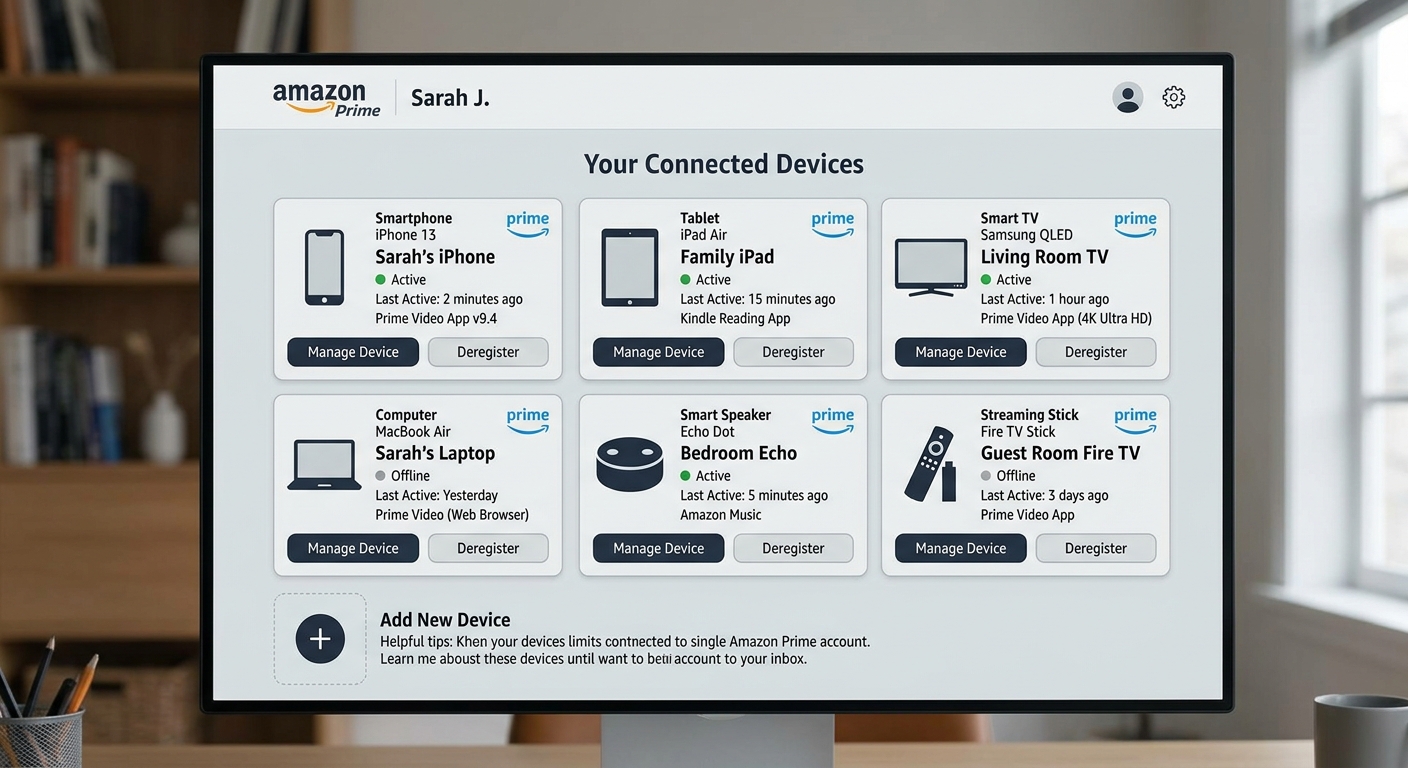
Managing Simultaneous Streams Across Amazon Prime Devices
Strategic planning maximizes your three simultaneous streams. Coordinate viewing schedules with household members. Simple communication prevents streaming conflicts. Prime Video displays clear error messages when limits exceed. The notification explains that too many devices are streaming. It prompts users to stop one active stream before continuing. Download content for offline viewing as a workaround. Prime Video allows downloads on mobile devices and tablets. Downloaded content doesn’t count toward simultaneous stream limits. This feature proves invaluable for travel or commutes. Profile management helps track who’s watching what. Create separate profiles for each family member. Individual watch histories and recommendations stay organized. Profiles don’t increase stream limits but improve user experience. The three-stream limit applies to all Prime content equally. Live sports, new releases, and classic movies share the quota. No premium tier offers additional simultaneous streams currently. Understanding how many devices can watch Amazon Prime helps families plan viewing schedules effectively.
Comparing How Many Devices Can Watch Amazon Prime vs Competitors
Amazon Prime’s three-stream limit sits comfortably in the middle range. Netflix Standard allows two simultaneous streams. Netflix Premium increases that to four streams. Disney Plus also supports four concurrent streams. HBO Max permits three simultaneous streams, matching Prime Video exactly. Paramount Plus offers similar limitations depending on subscription tier. Peacock Premium allows three streams as well. Apple TV Plus stands out with six simultaneous streams. This generous limit accommodates larger families easily. Hulu varies by subscription level, offering two or unlimited streams. Prime Video’s unlimited device registration provides competitive advantage. Most services limit total registered devices to 5-10. Amazon’s open policy simplifies household management significantly. Check out CNET’s streaming service comparison for detailed analysis. The three-stream allowance works for most households perfectly. Average families rarely need more simultaneous streams. Larger households might consider subscription sharing through trusted platforms. Understanding how many devices can watch Amazon Prime versus competitors helps consumers make informed choices.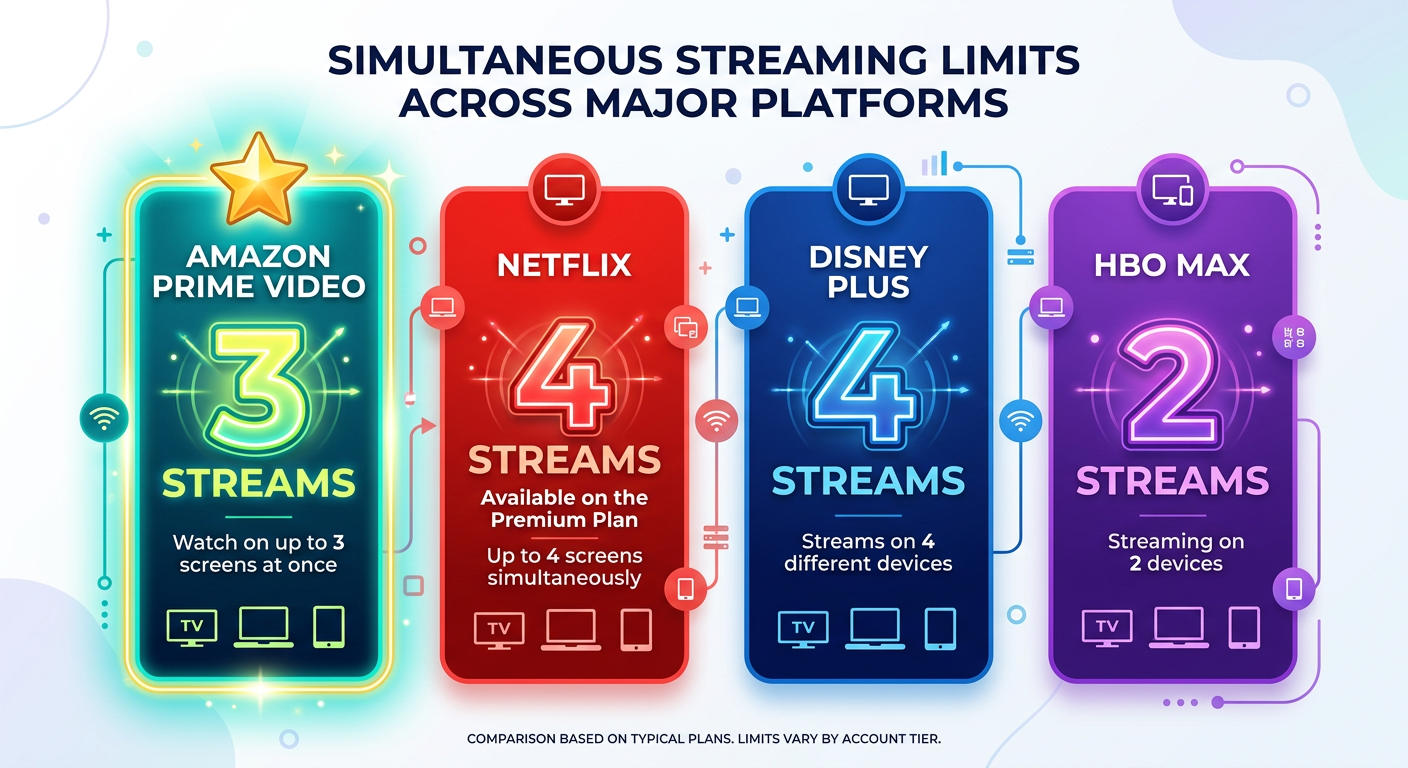
Optimizing Your Amazon Prime Device Strategy
Smart device selection maximizes streaming flexibility. Prioritize devices used most frequently. Register everything but plan active viewing strategically. Family communication prevents streaming conflicts entirely. Create a simple group chat for viewing coordination. Quick messages like “watching Prime now” help everyone stay informed. Leverage offline downloads extensively. Download movies before long flights. Pre-load kids’ shows before road trips. Downloaded content frees up simultaneous streams for other household members. Consider viewing patterns when sharing accounts. Stagger peak usage times naturally. Morning commuters can download content the night before. Evening viewers get live streaming access. Guest access requires temporary planning. When friends visit, family members might pause their streams temporarily. Alternatively, downloaded content keeps everyone entertained without exceeding limits. Security remains paramount with any sharing arrangement. Change passwords regularly. Remove unknown devices immediately. Monitor account activity through Amazon’s security settings. Understanding how many devices can watch Amazon Prime empowers users to make smart decisions about household streaming management and potential trusted sharing opportunities.